

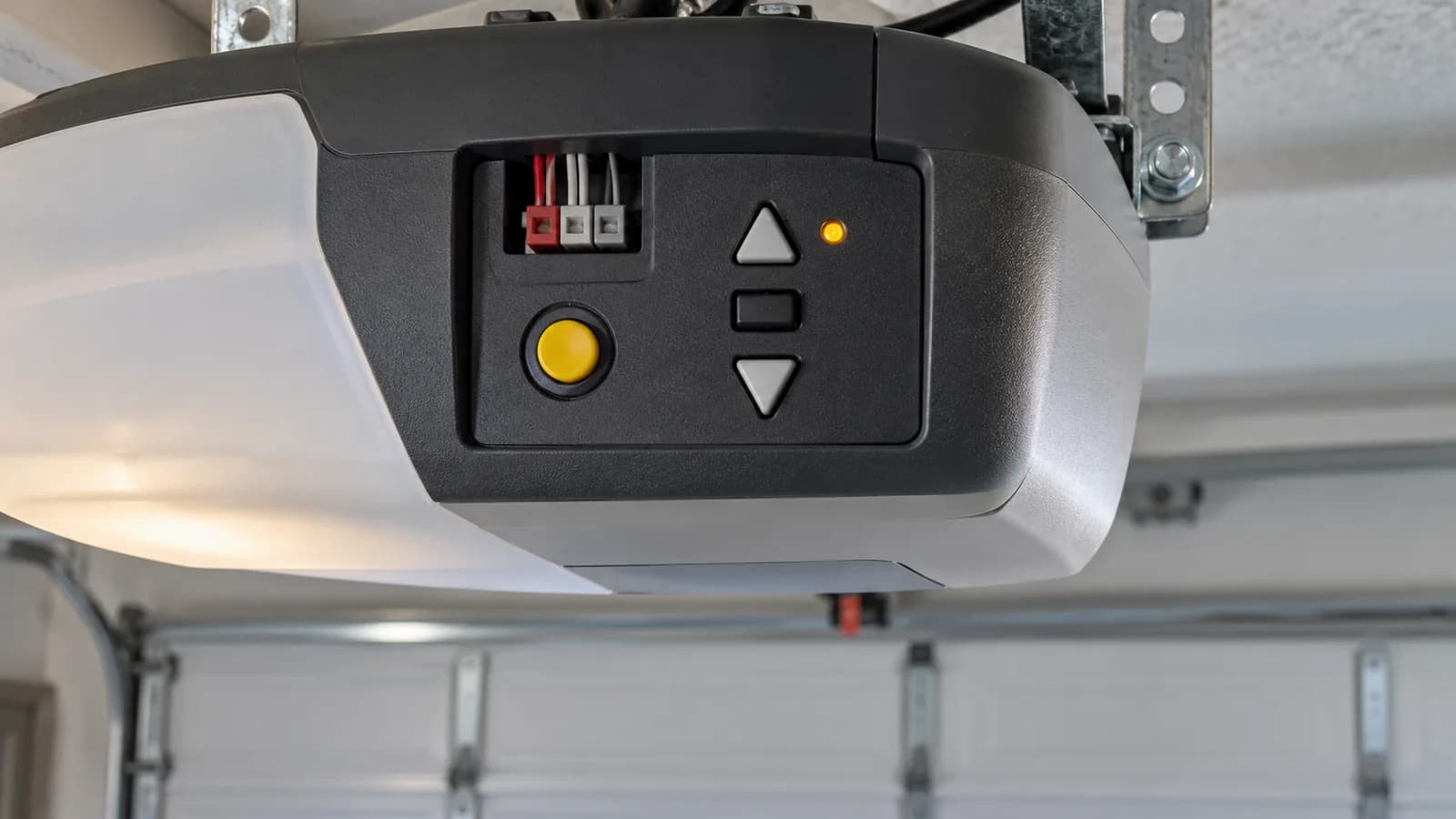
Your garage door opener is blinking and the door wont move. A diagnostic LED or adjustment arrows flashing in a repeating pattern point to a fault. Identify which light is blinking, then count the flashes before using the chart.
This guide covers Chamberlain, LiftMaster and Chamberlain-built Craftsman openers. Code meanings depend on the model and which light is flashing. Asmara Garage Door Repair Edmonton checks the code and the door's condition before replacing parts.
How to Read Your Garage Door Opener's Blinking Lights
Look at the motor unit on the ceiling. Your opener shows a code one of three ways:
- Up and down arrows. Newer openers with a yellow or white learn button flash an up arrow and a down arrow. Count the up flashes, then the down flashes. 4 up and 2 down is code 4-2.
- A small LED by the learn button. Older openers blink one light a set number of times, pause, and repeat.
- The main lights flash 10 times. On older supported models, this signals a safety sensor problem. Chamberlain removed this signal from newer openers and replacement boards starting in 2022. No 10-flash pattern does not rule out a sensor fault.
Wait for the pattern to repeat before you trust your count.
Chamberlain and LiftMaster Error Codes
These are common up and down arrow codes from Chamberlain's support guides. Use the chart for the model number on your opener. The wall-mount codes below apply only to models with the listed equipment. The owners manual has the full list for your model.
| Code | What the door does | What it means |
|---|---|---|
| 1-1 | Starts to close, then goes back up | A safety sensor is blocked, out of line, unplugged or has a broken wire |
| 1-2 | Wont close at all | The sensor wires are reversed or shorted |
| 1-3 | The wall control does not work | The wall-control wires are shorted or the control has a fault |
| 1-4 | Wont close or reverses while closing | The safety sensors are misaligned or the beam was briefly blocked |
| 1-5 | Hums or clicks, moves a few inches or not at all | The opener cant sense the motor turning |
| 1-6 | Opens, then drifts back down | The door moved without a command. An unbalanced door does this |
| 2-1 to 2-5 | Ignores every button | A fault on the logic board |
| 3-5 | Reverses part way down (wall-mount openers) | The cable tension monitor sees a loose cable |
| 4-1 | Stops or reverses while closing | Something is fighting the door on the way down |
| 4-2 | Stops before its fully open | Unexpected resistance while opening. Check for obstructions; a technician checks door balance and springs |
| 4-3 | Reverses just before the floor | Motor speed dropped while closing |
| 4-4 | Stops before its fully open | Motor speed dropped while opening |
| 4-5 | Wont move after a part was replaced | The opener doesnt recognize the travel module |
| 4-6 | Wont close or reverses | A sensor fault is still present when a close command is sent. Follow the model's sensor checks |
| 5-5 | App and schedules dont work, the buttons do (wall-mount openers) | The opener needs its paired remote light |
Craftsman Garage Door Opener Error Codes
Chamberlain-built Craftsman models with arrows use the matching arrow-code chart above. Older supported Craftsman models blink the LED next to the learn button:
- 1 flash: the sensor wires are cut or not connected.
- 2 flashes: the sensor wires are reversed or shorted.
- 4 flashes: the sensors are out of line or something blocked them for a second.
Older Chamberlain and LiftMaster openers use the same flash counts. For any other count, look up the chart for your model in the owners manual. The model number is on the label on the side of the motor unit.
Why Is My Garage Door Opener Blinking and the Door Wont Close?
When the lights flash and the door wont close, start with the safety sensors. They are the two small boxes near the floor on each side of the door. One sends a beam and the other catches it. If the beam breaks, the door goes back up.
- Move anything in the door path. Bins, shovels and boots break the beam.
- Wipe both lenses with a soft cloth.
- Look at the sensor lights. Both should glow steady. A dark or blinking green light means the sensor is out of line. Loosen the wing nut, aim it at the other sensor, and tighten it once the light goes solid.
- Both lights off? Check the sensor wires at the back of the opener.
Quick test on models with constant-pressure wall control: clear the entire door path, keep the door in sight, and press and hold the wall button until the door closes. Closing only while you hold the button points to the safety sensor system. Fix the sensor fault before returning to remote operation.
Is There a Reset Button on a Garage Door Opener?
Not a seperate one. The reset is a power cycle. Unplug the opener from the ceiling outlet, wait 5 seconds, and plug it back in. If your opener has a battery backup, disconnect the battery too, or the opener stays on. Our guide to the garage door opener battery backup shows where the battery sits and what its beeps mean.
A power cycle clears a glitch. It wont clear a code with a real cause behind it. If the same code comes back, the problem is still there.
Which Error Codes You Can Fix Yourself
Start with visible checks: 1-1, 1-2, 1-4 and 4-6 point to the sensor system on supported models. Older units use 10 work-light flashes too. Clear the beam, clean the lenses and inspect the wiring. Unplug the opener and disconnect its backup battery before touching wire terminals. Stop if the wire is damaged or the code stays. For remote trouble without a code, check the battery, compatibility and wall-control Lock setting. Our guide on how to program a garage door opener remote covers pairing.
Call a tech: 1-5, 1-6, 2-1 to 2-5, 3-5 and 4-1 to 4-5. These point to the motor, the logic board, the springs or the cables. Dont pull the red release cord with the door open, and never loosen a spring or a cable. They hold the full weight of the door.
Asmara techs carry gear kits, logic boards and remotes on the truck, so most of these codes get fixed on the first visit. Our garage door opener repair page lists everything we check.
Error Codes in an Edmonton Winter
Two kinds of codes show up more once the snow comes.
- 1-1, 1-4 and older models' 10 flashes. Snow, slush and road salt pile up at the bottom of the door and cover the sensor lenses. Clear and wipe them before you blame the opener.
- 4-1 and 4-2. At -30, grease turns thick and the bottom seal freezes to the floor. The opener feels the drag and stops. Dont keep pressing the button. Each try strains the gear.
Garage Door Opener Error Code FAQs
What do 5 blinks on a Chamberlain garage door opener mean?
Five work-light flashes signal an obstruction event on supported Security+ 2.0 models. Check the door path and the model's instructions. Five flashes of the small learn-button LED are a different legacy signal. If the arrows are blinking, count both: 1 up and 5 down is code 1-5, which means the opener cant sense the motor turning.
What does it mean when my garage door opener blinks 4 times?
On an opener with an LED by the learn button, 4 flashes means the safety sensors are out of line or something blocked them for a second. Clean them and line them up.
What are the common LiftMaster error codes?
The sensor codes 1-1 and 1-2, the drag and speed codes 4-1 to 4-4, and the logic board codes 2-1 to 2-5. The chart above covers each one.
Will the error code clear by itself?
Yes, once the cause is fixed. Run the door through one full open and close and the code stops flashing.